Heisenman Craft · Android App (70 MB)

Precision document craft. Zero cloud friction.

Paper and Craft lets you write Word-style documents, sign and shrink PDFs, scan paper pages, and jot handwritten notes right on your Android phone. Fast, calm, and completely private.

See All Features
  • Works 100% Offline—Even in Airplane Mode
  • No Account or Login Needed
  • No Ads, Trackers, or Hidden Uploads
  • Lock Private Files with Fingerprint or PIN
Layered coral, amber, and ivory craft sheets with a clean page sketch and stylus pen

Why We Built It

Paper should feel natural. Digital should feel instant.

Paper and Craft was built around one simple idea: your files belong to you. Whether you are writing a Word document, signing a PDF, or scanning notes, nothing ever gets sent to an outside server.

Your phone is your desk. You keep the only key.

01 · Private by Default
Saved to Downloads/Paper and Craft

Conventional Cloud Apps

  • Ask for an account login before you can edit
  • Track usage and require constant internet access
  • Upload your private documents to remote servers
  • Blur text when compressing or lock files inside the app
Paper and Craft emblem

Paper and Craft Workstation

  • No account or sign-in required — open and start writing
  • Works 100% offline — even in Airplane Mode
  • Lock private files with your fingerprint or PIN
  • Sharp text compression and standard folders you own

Core Suite · The Life of a Document

Follow one sheet from first word to sealed signature

Chapters Tested: 0 / 5 Interact along the ink line
01

Write · Word Pages

Word Document Editor

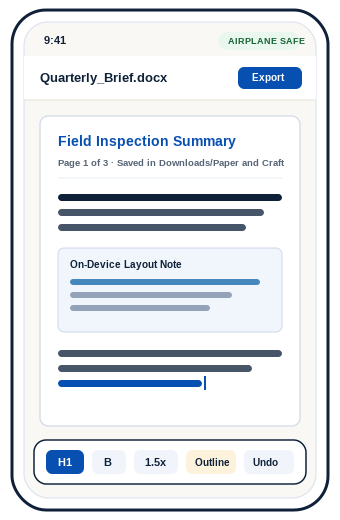
  • Real A4 page view with smooth, steady scrolling.
  • Easy text styling: headings, bold text, spacing, and alignment.
  • Clean, distraction-free page—just tap and start typing.
  • Quick undo/redo, section outline, and direct Word (.docx) saving.
LIVE DRAFT
Word · A4
Bold 1.5 Spacing Save Word
02

Sign & Shrink

PDF SEAL

Complete PDF Studio

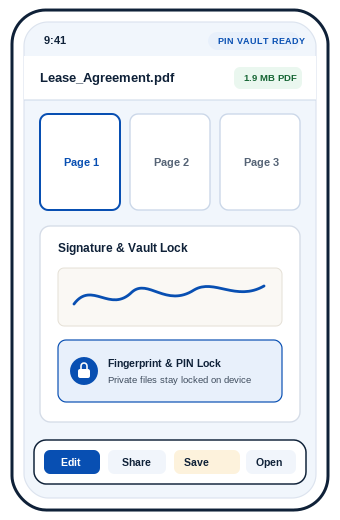
  • Reorder, rotate, split, and combine multi-page PDFs easily.
  • Fill & Sign: Add signatures, dates, text boxes, and checkboxes.
  • Shrink big PDFs so they send fast—without making text blurry.
SHRINK PDF
P.1
P.2 ↻
P.3
14.8 MB Sharp Text
03

Scan · Clean Crop

Smart Multi-Page Scan

  • Turn phone photos into clear, bright, easy-to-read pages.
  • Straightens crooked paper edges and removes shadows automatically.
  • Save scanned pages straight into a clean PDF or slide deck.
AUTO-STRAIGHTEN
Tilted Photo
05

Sketch · Freehand Notes

Stylus & Drawing Pad

  • Smooth ink for handwritten notes, quick sketches, and document markups.
  • Ignores your resting palm and varies ink thickness naturally as you write.
Craftsman Seal Unlocked
LIVE INK PAD
Palm Guard: ON
Drag slow for thick ink, fast for fine strokes

Inside the App & Safe Install Guide

Real phone screens, offline privacy, and a 3-step install

Paper and Craft Android screen showing an A4 DOCX document open offline with formatting toolbar
A4 DOCX Page Editor (works offline)
Paper and Craft Android screen showing multi-page PDF signing and fingerprint PIN lock
PDF Studio & Fingerprint/PIN Lock
Try the Fingerprint / PIN Lock

Preview how private files lock directly on your phone.

How to Install Safely in 3 Steps

Because Paper and Craft installs directly from our official site (outside the Play Store), Android shows a standard one-time permission prompt. Here is all you do:

  1. 1
    Download the 70 MB file

    Tap the Download APK button below to save the clean installer to your phone.

  2. 2
    Tap & allow install

    Open the downloaded file and tap Settings → Allow from this source once if Android asks.

  3. 3
    Open and create

    Launch Paper and Craft—no account, no login, and works 100% offline right away.

Works 100% Offline

Every tool—Word editing, PDF signing, scanning, and compression—runs on your phone, even in Airplane Mode.

Fingerprint & PIN File Lock

Lock sensitive documents behind your phone's fingerprint sensor or a private PIN.

Your Files Stay Yours

Saved files go straight into your normal Downloads/Paper and Craft folder so any app can open them.

At-a-Glance Specs

v1.0.0 Direct APK
Phone Compatibility
Works on almost any Android phone or tablet (2017 or newer)
Download Size
70 MB
Internet Needed
Works 100% offline—even in Airplane Mode
Privacy Lock
Lock private files with your fingerprint or PIN
Permissions Used
Camera (optional, only for scanning pages) & Storage (to save your files)
License
Proprietary © Heisenman Craft. All rights reserved.
Paper and Craft v1.0.0 direct edition artwork

Download & Get Started

Ready to write, sign, and scan offline?

Install the single 70 MB app once and keep your Word editor, PDF signer, paper scanner, and drawing pad everywhere—even without internet.

  • Word Document (.docx) Editor & Export
  • Full PDF Signer & Sharp File Shrinker
  • Smart Paper Scanner & Page Straightener
  • Drawing Pad & Fingerprint / PIN Lock
File verification code (for advanced users)
SHA-256 (v1.0.0) 8f4e2c91a7b04d6f3e19c8a2b5d7e041f6a3c928d4e1b7a05c8f29e6a1d4b307

Contact & Support

Direct human support

Need help installing the APK or have feedback about a feature? Send a note here or email helloheisenman@gmail.com.